Connect a wallet
Connect MetaMask, Rabby or Phantom and switch to Robinhood Chain.
#You need
- MetaMask, Rabby or Phantom, in this browser or on a phone
- A visit from outside the United States, Canada, the United Kingdom and Switzerland
- No ETH: connecting sends no transaction
The values the app sends to add the network, and how each wallet connects on a phone: Wallets and network.
#Steps
- 01Open the appOpen the app at app.kyzen.network. Before a wallet connects, the top bar shows the network, a balance of 0 $KYZN and Connect wallet. Press Connect wallet.

Test amounts on Robinhood Chain testnet. - 02Choose a walletThe Connect a wallet dialog lists MetaMask, Rabby and Phantom. A wallet found in this browser reads Detected in this browser, with Connect. One not found reads Not installed, with Install, which opens its download page. Press Connect beside your wallet.
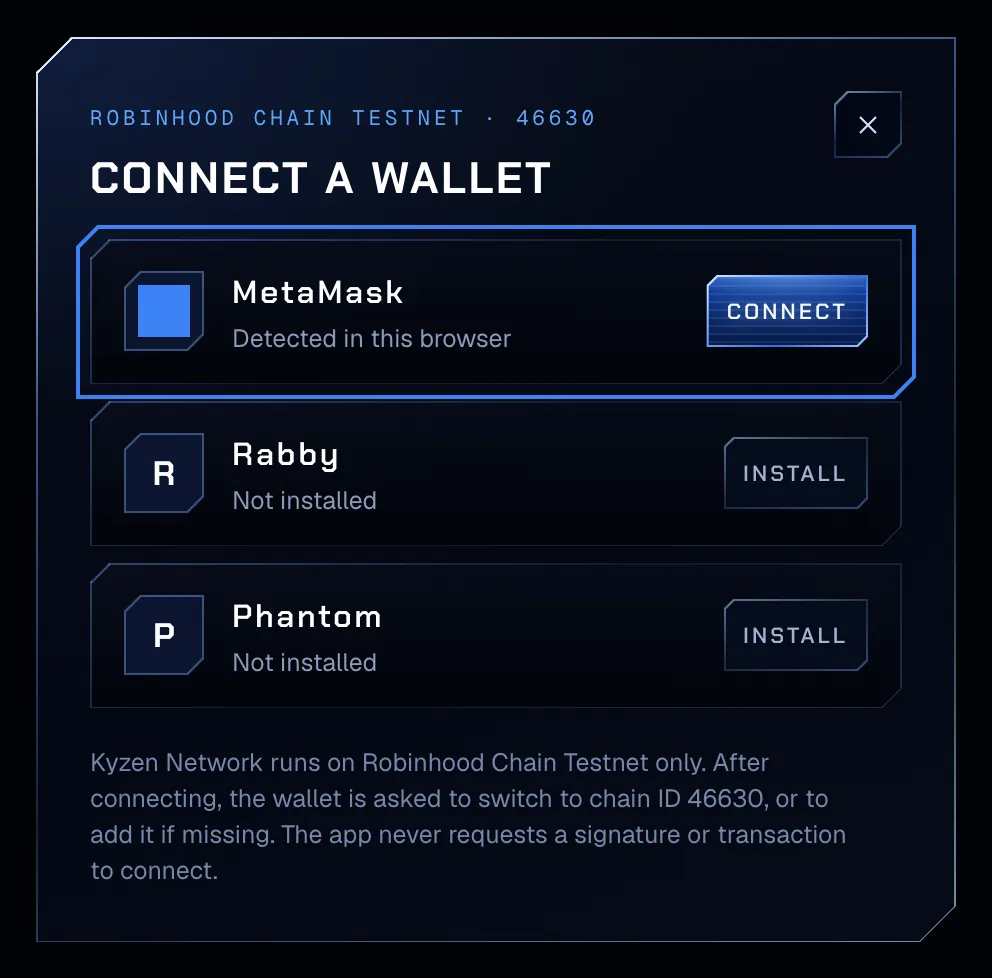
Test amounts on Robinhood Chain testnet. - 03Approve the connectionThe wallet opens and asks to share your address with the app. Approve it. The app asks for no signature and no transaction to connect.
- 04Approve the networkThe app then asks the wallet to switch to Robinhood Chain, chain ID 4663, or to add the network when the wallet does not have it. Approve the request in the wallet.
- 05Check the top barConnected on Robinhood Chain, the network pill lights, the balance reads your $KYZN, and the wallet pill shows your address in short form. The app remembers the wallet in this browser. Select the wallet pill to disconnect.

Test amounts on Robinhood Chain testnet.
#If it does not connect
- 06Switch the networkOn any other network, a banner reads Wrong network. Switch to Robinhood Chain (chain ID 4663). Every action is blocked on any other network. Press Switch network and approve the request in the wallet. Until then, every action button reads Switch to Robinhood Chain.

Test amounts on Robinhood Chain testnet.
| The app shows | What to do |
|---|---|
| The connection request was declined in the wallet. | Press Connect wallet again and approve the request in the wallet. |
| The network switch was declined in the wallet. | Press Switch network in the banner and approve the request. |
| Adding Robinhood Chain was declined in the wallet. | Press Switch network and approve the network the wallet is asked to add. |
| MetaMask could not add Robinhood Chain. | Add the network by hand with the values in Add Robinhood Chain, or connect another supported wallet. The message names your wallet. |
| The wallet did not connect. Try again. | Unlock the wallet, then press Connect wallet again. |
| Not installed | Install the wallet from its own site, then reload the app. |
| Open in app, or Copy link, on a phone | Open the app inside the wallet’s own browser (On a phone). |
| Not available in your region | The app is closed in four countries (Where the app opens). |